Start with the thing you actually have.
A tutorial URL, phone MOV, or rough voice note can enter through Watch Source or Personal Source.
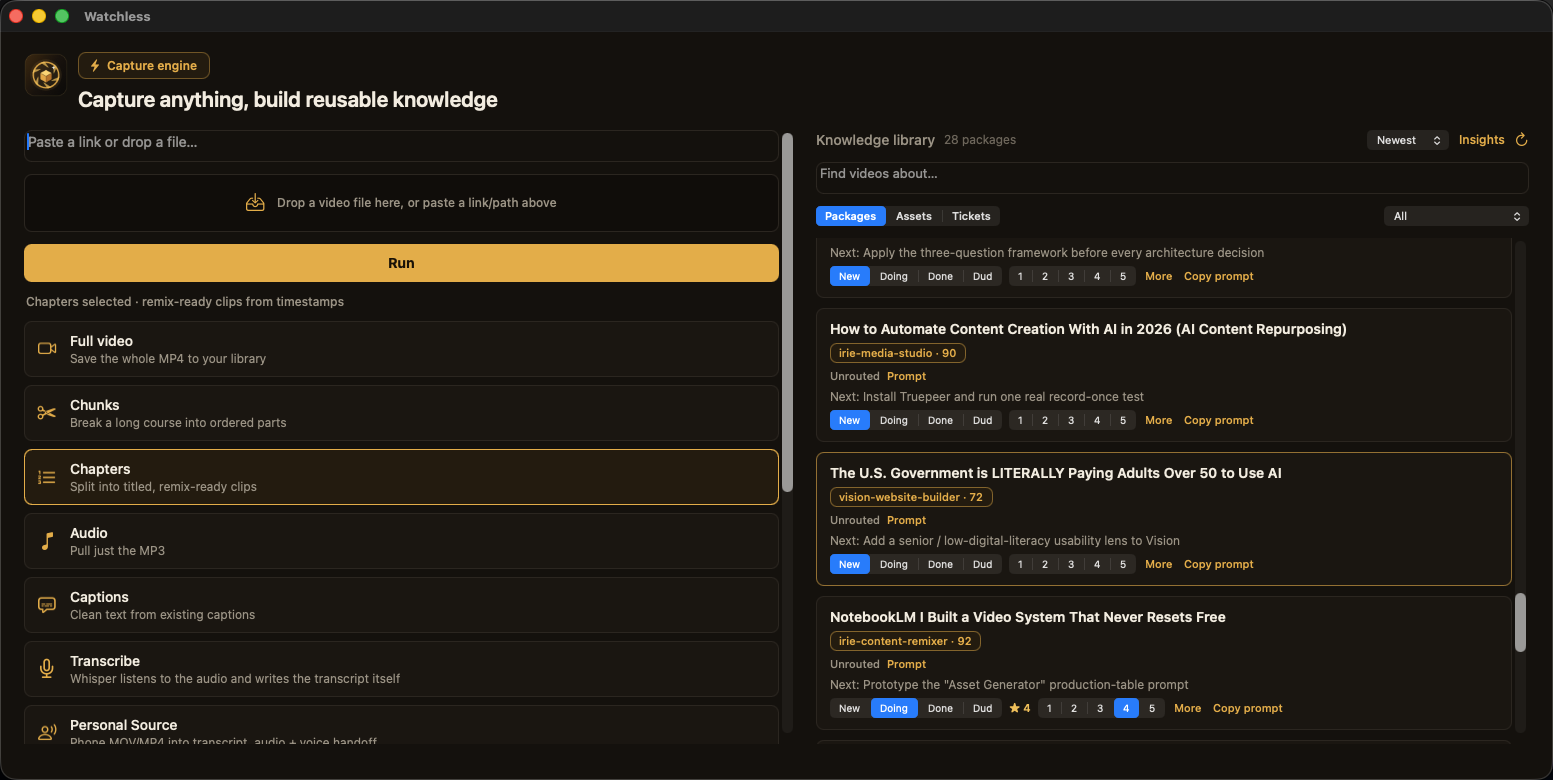
Turn what you watch and what you say into work your AI agent can build from.
Bring a tutorial, course module, Loom, call, or phone recording. Watchless keeps the source, writes the transcript, and returns the builder brief, script prompt, and next move in ordinary local folders.
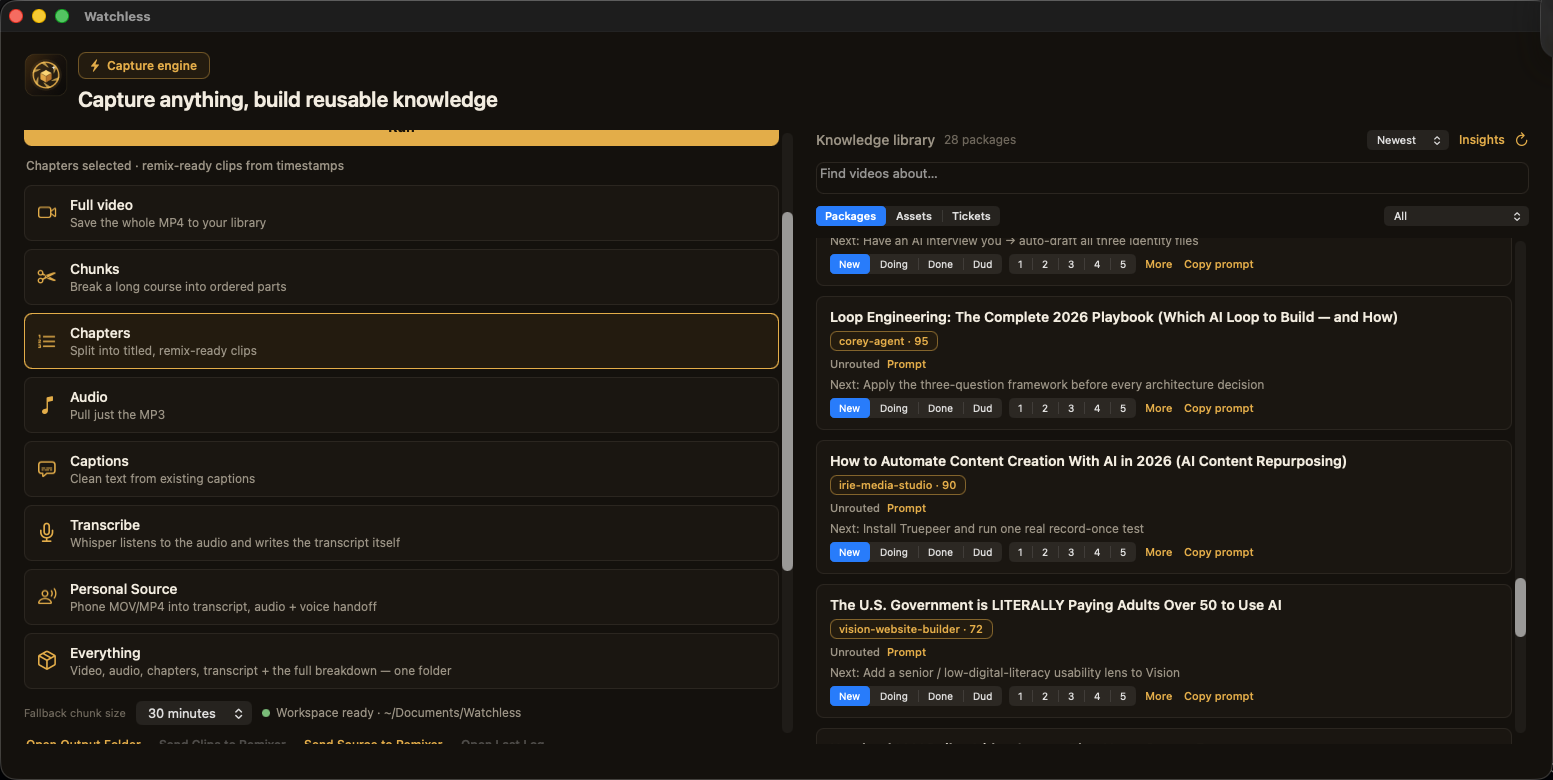
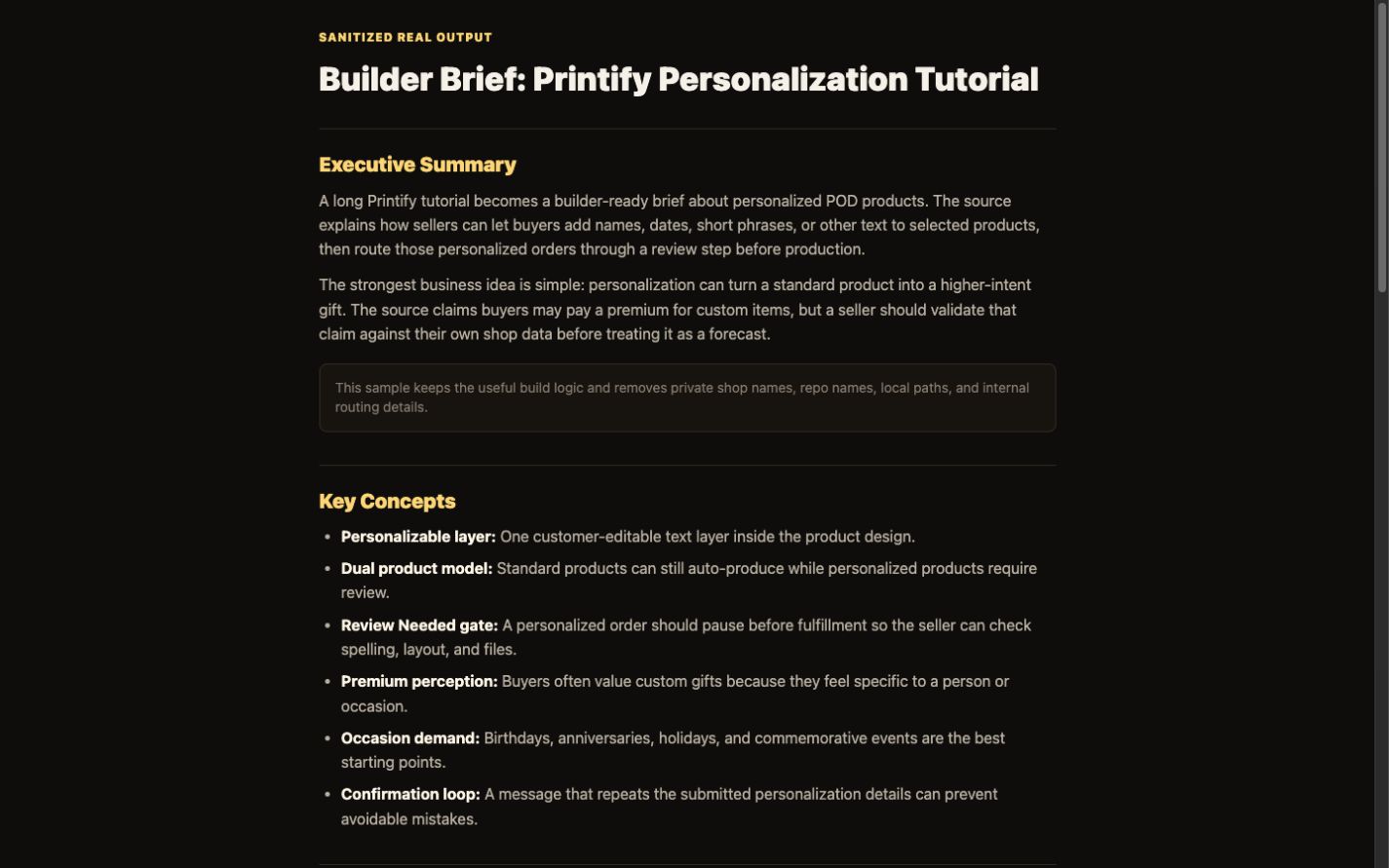
The page includes the product shape, the local folder shape, and a sanitized builder brief from a real capture. You do not have to take the promise on faith.
Watchless ships as a native AppKit .app inside a DMG. It creates the customer workspace on first launch.
Media, audio, transcript, chapter clips, route files, and handoffs stay together in ordinary local folders.
The Printify sample keeps the generated structure and useful logic while removing private repo names, paths, and routing details.
Watchless handles the AI connection, model, and usage limits. You do not supply a provider key or install developer tools.
Watchless is built for the desktop because source work means real files, transcripts, local folders, and agent-ready packages. The page works on a phone, but the product is for builders working at a Mac.
Tutorials, talks, interviews, courses, demos, podcasts, internal training, and permitted research become chapters, transcript, notes, builder brief, project matches, and build prompt.
Phone MOVs, build diaries, founder notes, rough ideas, decision logs, and story capture become a transcript, personal-source handoff, and script prompt.
Media, audio, transcripts, source notes, and knowledge files stay together so you can search them, hand them to an agent, or move them into your next project.
These are real Watchless surfaces. Nothing is blurred into mood or cropped into decoration.
A tutorial URL, phone MOV, or rough voice note can enter through Watch Source or Personal Source.
Media, transcript, routing, and next actions stay together in the local library.
The builder brief gives your agent the logic, concepts, project fit, actions, and acceptance criteria.
A tutorial URL. A phone MOV. A rough voice note after a build. Choose Watch Source or Personal Source without changing how you capture.
Choose how far each run should go. Local capture stands on its own, while managed analysis is available when you want a knowledge package.
Save the video, audio, transcript, and useful chapters. This level still works when the managed service is unavailable.
Watchless sends the transcript and basic source details for managed analysis, then writes the returned knowledge files into your local folder.
Include a local visual timeline and send no more than eight resized JPEG frames with the transcript for managed analysis.
Watchless works without GitHub. Connect selected repositories or approve a local project home once. Watchless then discovers new repos and keeps their project context current. You can also start without project context.
One run hands you the media, transcript, and chapters when they help, plus source handoffs that turn the material into work you can act on.
Watch Source creates the full knowledge/ breakdown. Personal Source keeps your phrasing intact and turns the recording into a script-ready handoff.
Nine files that take one watched source from "I saw that" to "here's my next move."
The gist — thesis, arguments, takeaways. Know what it's about in 30 seconds.
The key ideas and concepts, pulled out and named.
The concrete things the video actually tells you to do.
Every project you've registered, scored 0–100 for how much this video helps it.
A P0–P3 plan across your projects: what to change, which files, and why.
A roadmap ranked by impact vs effort — and the one move to make first.
A spec your AI agent runs cold: schema, files to touch, acceptance criteria.
Tracks what you actually did with it, so your library learns what pays off.
Topics, frameworks, and creator tags that make your whole library searchable.
Your capture folder stays on your Mac. When you choose a managed knowledge level, Watchless sends only the inputs needed to produce that analysis.
Your source media and working files remain in ordinary local folders you can inspect, move, archive, or delete.
Knowledge Pack sends the transcript, basic source details, and sanitized project cards when configured. Visual Evidence also sends up to eight resized JPEG frames. GitHub credentials, repository URLs, and local paths are excluded.
Quick Capture still saves local media, audio, transcript, and chapters when the analysis service is unavailable. Your completed local files are not deleted.
Most "summarize YouTube" tools break the moment a video isn't on YouTube or has no transcript. Watchless reads the audio itself, including your own local recordings.
Paste a supported link and keep the source, transcript, and useful chapters together.
No captions? It transcribes the audio and breaks it down anyway.
Drag in the file and get a build plan, script starter, or personal source handoff.
This proof uses a real Printify capture package. The folder names and media sizes stay visible. The brief keeps the generated structure and removes private system details.
"NEW Claude AI Affiliate Marketing Side Hustle…"
2:14:00 videoP0 · Add Amazon Best-Sellers scoring to Product Scout
relevance 92 · with the files to touch + acceptance criteria
build-prompt your agent runs coldNothing to install, no key to set up. Send a link or a personal recording you keep meaning to act on. It runs through the full engine, and you get back the complete folder with transcript, source handoff, and the right next file for the lane: builder brief, build prompt, or script prompt.
One source, up to two, plus one line about what you're building.
A course module, a tutorial, a talk, a Loom, a call, or your own phone recording. Anything with signal in it.
The full package: media, transcript, lane-specific handoff, project match where useful, builder brief, build prompt, or script prompt.
$99 · credited toward the full system when you upgrade. If the package isn't useful, the $99 comes back and you keep the files.
It's a system, not a utility. One captured course can hand you an SOP, and one personal recording can become scripts, launch copy, or agent context. The price matches the saved hours and clearer inputs, not the tokens.
You do not paste an API key, sign in to a developer tool, or open Terminal. Watchless manages the OpenAI connection for knowledge analysis, and the finished package is written back to your Mac. Core System includes 50 managed analyses per UTC month with no automatic overage charges.